


Last updated on: May 28, 2026 3:03 am


Sorting content inside WordPress has always required a balance between flexibility and usability. Website owners often know exactly how they want posts, products, events, or custom post types organized, but creating advanced sorting rules can quickly become technical and time-consuming.
The new AI Prompt functionality in Advanced Post Types Order changes that process completely.
Instead of building sorting logic manually, users can now describe the desired order in plain language. The plugin sends the request to an AI engine, receives a structured sorting schema in return, and instantly applies the logic inside WordPress.
The result is a faster, smarter, and more accessible way to create advanced ordering rules for any type of content.
Table of Contents
A Smarter Way to Build Sorting Logic
The new AI Prompt system was designed to remove complexity from advanced ordering tasks.
Rather than configuring multiple sorting parameters manually, users simply type instructions into a prompt field. The request can be as simple or as advanced as needed.
For example:
- “Sort tutorials by newest first.”
- “Show featured products first, then sort the rest by sales.”
- “Group posts by category and sort each group by popularity.”
- “Sort by category A-Z, but inside each category sort by views descending.”
- “Group by category, order categories by total sales, then sort items inside by sales descending.”
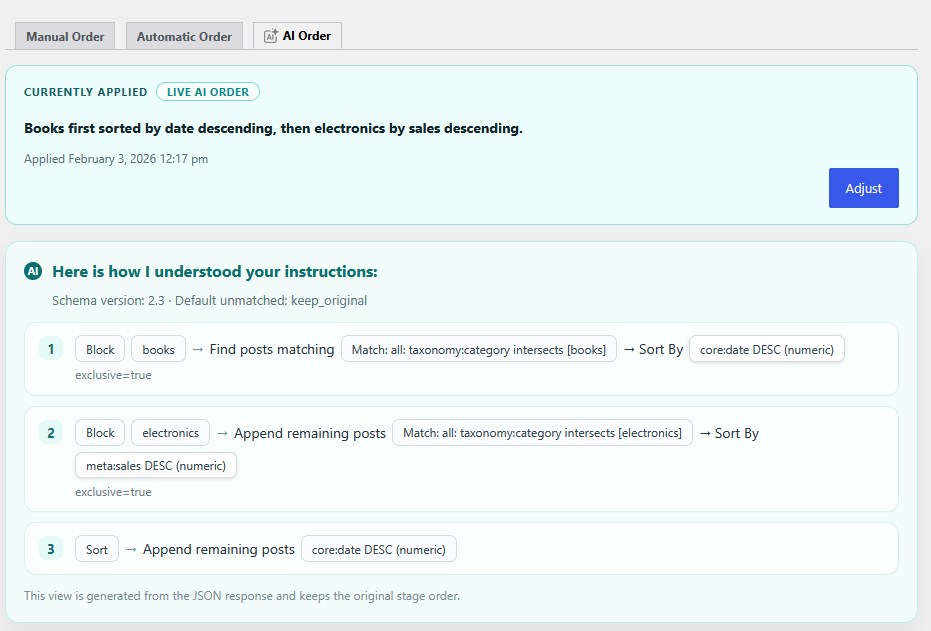
- “Sort by category blocks: books first newest, electronics second best-selling, everything else by title.”
Once submitted, the plugin processes the request through an AI-powered interpretation layer ( OpenAI ).
The AI does not directly sort the content itself. Instead, it returns a structured schema containing the exact ordering logic. Advanced Post Types Order understands this schema and uses it to generate the final ordering behavior.
This approach provides several important advantages:
- The sorting logic remains predictable and structured.
- The generated order can be reused without repeated AI calls.
- The plugin maintains full compatibility with WordPress queries.
- Performance remains extremely efficient.
The feature was built specifically for WordPress users who need powerful ordering capabilities without learning custom query structures or complex configuration workflows.
Designed for Real WordPress Data
One of the most important aspects of the AI Prompt functionality is context awareness.
To keep the process accurate and efficient, the plugin sends additional information together with the user prompt. No actual values are sent out.
This includes:
- Current post type configuration
- Available custom fields and meta keys
- Registered taxonomies
- Existing sorting context
This allows the AI engine to understand the actual structure of the website before generating the sorting logic.
For example, if a WooCommerce store contains meta fields like _price, _stock_status, and _sales_count, the AI can map sorting instructions directly to those fields.
If a site uses custom taxonomies such as “Brands”, “Regions”, or “Tutorial Types”, the AI can incorporate those terms into the generated order.
Because the AI receives the actual data structure from the website, the generated logic becomes highly reliable and tailored to the site itself.
This context-driven approach also reduces mistakes and prevents generic or invalid sorting instructions.
Built for Efficiency and Low Cost
AI-powered functionality often raises concerns about pricing and performance.
The AI Prompt system in Advanced Post Types Order was specifically engineered to remain lightweight and cost-effective.
A single prompt request typically costs below $0.005.
This is possible because the plugin sends only the information required to interpret the sorting request. The process avoids unnecessary data transfers and focuses exclusively on generating the sorting schema.
Even more importantly, prompts are not repeatedly processed.
Once an AI Prompt is generated, the returned schema is saved locally and reused whenever the order needs to be applied again.
This means:
- No repeated AI costs
- No unnecessary API requests
- Faster future sorting operations
- Consistent ordering behavior
The AI API is contacted only once during the prompt generation stage.
After that, the generated algorithm becomes part of the saved sorting configuration.
This architecture makes the feature practical even for large websites with frequent ordering operations.
Live AI Order vs AI Order to Manual Order
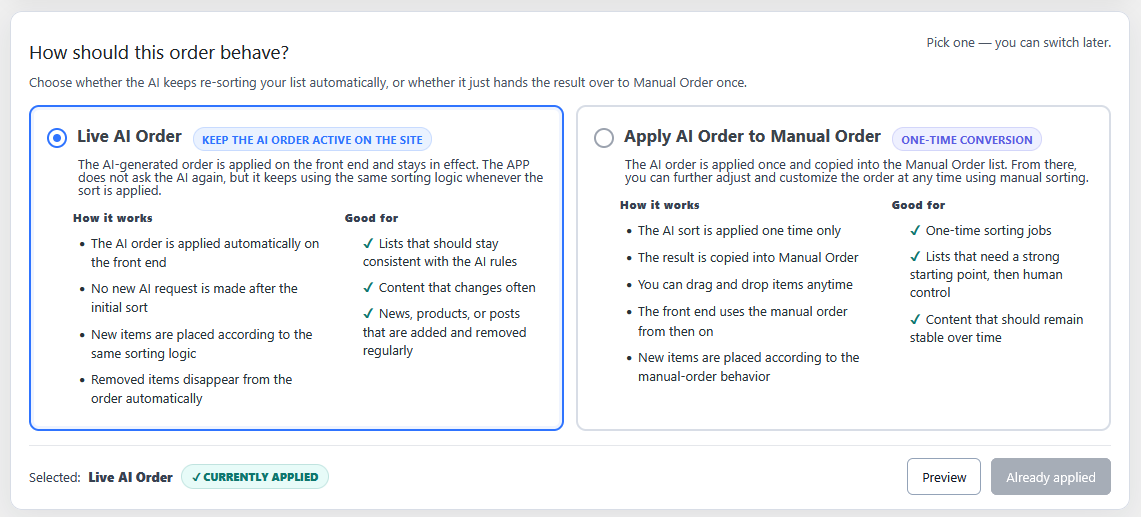
The AI Prompt functionality includes two different application modes, giving users flexibility depending on their workflow.
Live AI Order
Live AI Order applies the generated sorting logic dynamically on the front end.
Once enabled, the website continuously uses the saved AI-generated algorithm whenever the relevant query runs.
This means content automatically follows the defined sorting behavior without requiring manual adjustments.
For example:
- New products can automatically appear based on sales performance.
- Fresh tutorials can stay prioritized by publish date.
- Popular content can continuously rise based on engagement.
The AI schema itself remains static after generation, but the data it evaluates can continue changing.
This creates an intelligent dynamic ordering system while still maintaining predictable performance.
Apply AI Order to Manual Order
The second mode converts the generated order into a manual order list.
In this workflow, the AI generates the initial arrangement, then transfers the result into the plugin’s Manual Order interface.
Users can then fine-tune the final order manually through drag-and-drop adjustments.
This mode is especially useful when:
- Creating a strong editorial starting point
- Organizing large collections quickly
- Combining automation with human control
- Building curated landing pages
The AI effectively handles the heavy lifting, while users retain complete editorial flexibility.
Prompt Reusability Across the Website
One of the most practical aspects of the system is prompt persistence.
Saved prompts can be reused later without additional AI processing costs.
This makes the feature suitable for:
- Archive sorting
- WooCommerce product ordering
- Directory listings
- Event calendars
- Portfolio organization
- Knowledge base content
- Membership areas
- Editorial workflows
A single prompt configuration can become a reusable ordering strategy across multiple areas of the website.
This is especially valuable for larger WordPress installations where consistent ordering behavior is important.
Flexible Sorting Possibilities
The AI Prompt system supports far more than simple ascending or descending sorting.
Because the AI generates a structured ordering schema, users can create highly advanced sorting behavior using natural language.
Some examples include:
Content Priority Rules
- Put featured posts first
- Prioritize editor picks
- Keep premium products at the top
- Push upcoming events before expired events
Multi-Level Sorting
- Sort by sales, then rating, then date
- Order by category and then title
- Group by year and sort each year separately
Conditional Logic
- Prioritize products only if in stock
- Ignore ratings with low review counts
- Apply fallback sorting when values are missing
Group-Based Ordering
- Group content by category
- Sort brands by total revenue
- Organize authors by popularity
The system transforms natural language into structured sorting behavior while keeping the interface approachable for non-technical users.
Example AI Prompt Ideas
Here are several example prompts that demonstrate the flexibility of the feature.
- Sort posts by title A–Z using natural sorting.
- Show featured products first, then everything else by newest date.
- Sort by stock quantity descending, then by publish date.
- Tutorials first sorted by newest, then guides alphabetically.
- Sort by price ascending, with missing prices at the end.
- Group content by category and order categories by total sales.
- Put products first, then blog posts, then pages.
- Sort upcoming events by event date and move past events last.
- Sort by popularity score using views and comments.
- Keep videos first, then sort tutorials by reading time.
These examples highlight how users can express complex requirements naturally without manually configuring advanced query rules.
Built for the WordPress Ecosystem
The AI Prompt functionality was developed specifically for WordPress workflows.
Instead of acting as a disconnected external automation layer, the system integrates directly into the Advanced Post Types Order architecture.
The generated sorting schemas work with:
- Native WordPress post types
- Custom post types
- Taxonomies
- Meta fields
- WooCommerce data
- Editorial workflows
- Front-end query ordering
This tight integration allows the feature to feel like a natural extension of WordPress itself.
The interface also keeps the process simple and approachable.
Users can enter instructions through a dedicated prompt area, review how the plugin interprets the request, and choose how the generated order should behave.
The result is a workflow that combines the accessibility of AI with the reliability and control required by professional WordPress websites.
Frequently Asked Questions
Does the AI directly reorder the database?
No. The AI only generates a structured sorting schema. Advanced Post Types Order interprets and applies the schema within WordPress.
Are prompts processed every time the sort runs?
No. The AI is contacted only once when generating the sorting logic. The returned schema is saved and reused afterward.
Does this increase website loading times?
No. Since the AI response is saved locally, front-end ordering does not require repeated API calls.
How much does a prompt request cost?
A typical AI Prompt request costs below $0.005.
Can AI-generated orders still be edited manually?
Yes. Users can apply the generated order to the Manual Order and continue adjusting items manually.
Is the feature compatible with custom post types?
Yes. The system was built specifically for WordPress custom post types, taxonomies, and meta fields.
Can prompts use custom fields and taxonomies?
Yes. The plugin sends available meta fields and taxonomies together with the prompt so the AI can map sorting logic correctly.
Is this feature useful for WooCommerce?
Absolutely. Product sorting based on sales, stock, price, featured status, ratings, and custom taxonomies works especially well with AI Prompts.
Do saved prompts require additional API costs later?
No. Once a prompt is generated and saved, it can be reused without additional AI costs.
Can AI Prompts be used for dynamic front-end ordering?
Yes. Live AI Order continuously applies the saved sorting logic whenever the relevant query is executed.
The new AI Prompt functionality in Advanced Post Types Order introduces a smarter way to organize WordPress content.
By combining natural language input with structured schema generation, the feature allows users to create advanced ordering logic without dealing with technical query configuration.
The system remains efficient, affordable, reusable, and deeply integrated into WordPress workflows.
Whether used for WooCommerce products, editorial content, directories, events, or custom post types, AI Prompts provide a powerful new approach to content organization inside WordPress.