

Last updated on: February 24, 2026 3:44 am


By default, content sorting in Advanced Post Types Order is by default limited to administrators. This makes sense from a security standpoint, but in many real-world projects, other user roles—such as editors, contributors, or WooCommerce store managers—also need the ability to manage content order. Fortunately, the plugin provides a flexible way to grant sorting access without writing custom code.
This article explains how to allow additional user roles to sort posts by adjusting the Capability / Role option in the Sort List settings.
Prerequisites: Create a Simple Sort First
Before adjusting permissions, make sure you have already created a basic sort for your post type. If you haven’t done this yet, follow the official guide on creating a simple sort for a custom post type. Once the sort is active and visible for administrators, you can safely move on to configuring access for other roles.
Understanding the Capability / Role Setting
Each Sort List in Advanced Post Types Order includes a Capability / Role option. This setting determines which users are allowed to see and use the drag-and-drop sorting interface in the admin area.
In WordPress, permissions are controlled by capabilities (such as edit_posts) and roles (such as Editor or Contributor). Advanced Post Types Order allows you to work with either approach, making it compatible with both default and custom roles.
Granting Sorting Access to Other Roles
After creating your sort, follow these steps:
- Go to Advanced Post Types Order → Sort Lists.
- Edit the Sort List tab item you want to modify.
- Locate the Capability / Role option in the Sort List settings area.
- Change the default Administrator capability with one that matches your target users.
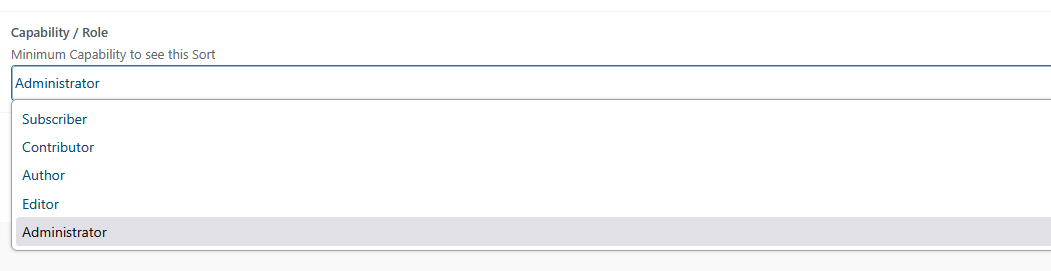
Once saved, users with the specified capability or role will immediately see the sorting interface when accessing the post list.
Best Practices and Security Considerations
Only grant sorting access to roles that genuinely need it. Changing content order can affect front-end layouts, menus, and user experience. It’s recommended to test the new permissions with a non-administrator account to ensure everything works as expected and that users only have access to the intended post types.
By adjusting the Capability / Role option, Advanced Post Types Order makes it easy to extend sorting functionality beyond administrators. This approach keeps your workflow flexible while staying aligned with WordPress’s native permission system—no custom development required.