


Last updated on: July 6, 2026 1:01 am


Need to sort WordPress posts by a custom field instead of the default publish date? Maybe you’re organizing events by start date, products by price, or portfolio pieces by priority. Normally, that means writing a pre_get_posts hook, setting orderby to meta_value (or meta_value_num for numbers), and pointing it at the right meta_key inside a WP_Query — get any of that wrong, and the whole listing breaks.
The Advanced Post Types Order plugin skips all of that. With a simple point-and-click interface, you can sort WordPress posts by any custom field value in a few clicks — no code, no template edits, no risk of a broken query. Just choose your options, and the plugin handles the sorting for you, in real time.
Step-by-Step: How to Sort WordPress Posts by Custom Field Value
Here’s how to sort your WordPress posts by a custom field value:
- Access the Reorder Interface: Go to the Advanced Post Types Order screen for your custom post type. This is where you’ll configure how your posts are sorted.
- Select the Relevant Taxonomy: Choose the taxonomy that applies to the posts you want to sort. In this example, we’ll use “Categories.” Once selected, pick the specific term — for instance, a category called “Blog.”
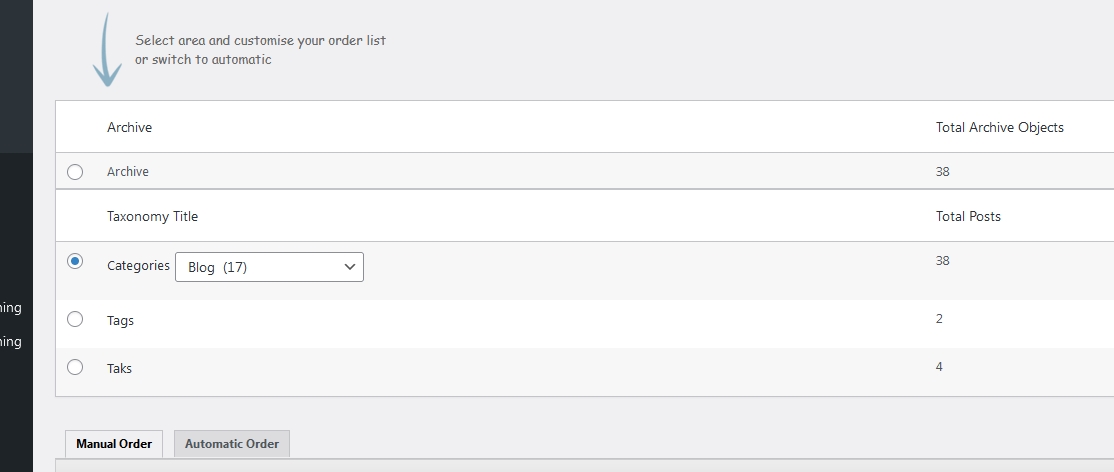
- Enable Automatic Ordering by Custom Field: Choose the Automatic Order option, then select Custom Field from the list of available sorting methods. This tells the plugin to sort your posts by a custom field value instead of manual drag-and-drop order.
- Specify the Custom Field Name: Enter the exact custom field name (its post meta key) that you want to sort by. This must match the custom field key saved on your posts — if you’re using Advanced Custom Fields (ACF) or a similar plugin, remember this is the field’s name, not its display label.
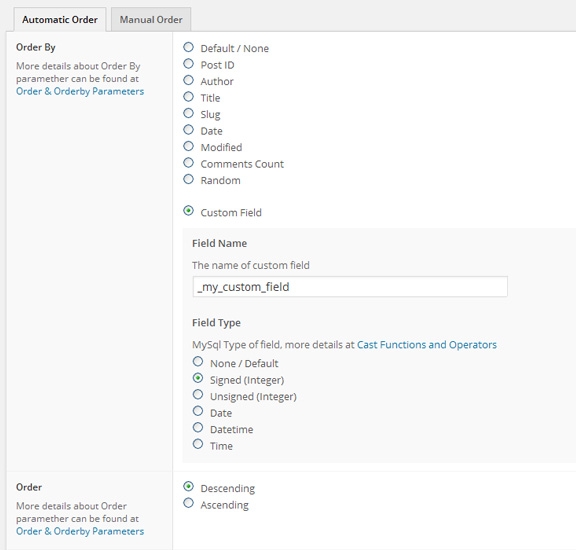
- Apply the Changes: Click Update. The plugin immediately sorts your posts by the custom field values you specified.
And that’s it — your posts are now sorted by custom field value, giving you full control over how your content displays, with no code involved.
How WordPress Normally Sorts Posts by Custom Field
Without a plugin, sorting posts by a custom field usually requires creating or modifying a custom WP_Query.
For example:
$args = array(
    'post_type'  => 'post',
    'meta_key'   => 'priority',
    'orderby'    => 'meta_value_num',
    'order'      => 'ASC'
);
This approach works well for developers but requires editing theme files or custom templates.
The Advanced Post Types Order plugin applies the same type of ordering automatically through an intuitive interface, eliminating the need to modify PHP code.
Why Sort WordPress Posts by Custom Field with Advanced Post Types Order
Sorting by custom field through Advanced Post Types Order comes with a few clear advantages:
- No-Code Sorting: A visual, user-friendly interface handles the technical work — no
functions.phpedits orWP_Queryarguments required. - Sort by Any Custom Field: Order posts using any custom field or post meta value — dates, prices, ratings, or your own custom data — for complete control over how content is organized.
- Real-Time Updates: Once you save your settings, the new sort order applies immediately, with no manual adjustments or extra code needed.
- Broad Compatibility: Works with default posts, pages, and any custom post type — hierarchical or not — and plays well alongside other WordPress plugins and themes.
Whether you’re sorting blog posts, products, or any custom post type, Advanced Post Types Order gives you a fast, code-free way to sort WordPress posts by custom field value and keep that order exactly how you want it.
Frequently Asked Questions
Does this work with any post type, or only default WordPress posts? Any WordPress post type — default posts and pages, or a custom post type — whether it’s hierarchical or not.
Can I sort by a custom field created with Advanced Custom Fields (ACF)? Yes. Since ACF, like virtually every custom fields plugin, stores its data as standard post meta, you can sort by it the same way. Just enter the field’s actual meta key/name, not its display label.
Do I still need orderby => meta_value in my theme’s queries? No — that’s exactly what the plugin avoids for you. If you have a separate custom query elsewhere on your site (in a template file, for instance), just make sure it includes 'orderby' => 'menu_order' so it respects the sort order you’ve set here.
Where do newly published posts land in the sort order? That’s controlled by a setting in the plugin’s sort list options, so you can choose whether new posts join the top or the bottom of the list.
Is this functional for any post types or only for Posts?
All default/custom defined WordPress post types are supported for this feature to be used along with.
This will work for any WordPress custom post types, either default (post, pages) or custom defined.
If I’ve created my post types using the WordPress register_post_type() function, is there a parameter I need to add in to that code to allow your plugin to work?
There are no additional requirements for the Advanced Post Types Order plugin to work with your custom post types no matter the way you create those, either through code using register_post_type() or by using a custom plugin
Thanks for your reply.
That’s odd, the post types I’ve created using Custom Pot Type UI plugin show the re-order menu, but the ones I’ve created using a function don’t and not sure why.
You must be using the wrong hooks to register your post types, check this page for more info
Yea, thats what I’m using. The problem was my post type was set to ‘hierarchical’ => true, when it needs to be ‘hierarchical’ => false.
May have been my error if this is in the plugin documentation.
Daniel are you sure you use the Advanced Post Types Order plugin? As it support both hierarchical and non-hierarchical structures.
The hierarchical only work with the premium version.
Hi,
I use wordpress 3.5.1
I have this error when i click the update button to reoder my custom type post in admin (wp-admin/load-script.php – jQuery v1.8.3) :
Error: cannot call methods on sortable prior to initialization; attempted to call method ‘serialize’
Can you help me ?
Hi,
Please download the latest plugin files using the personal link you got when bought the plugin which will fix the problem.
Hi,
It resolved the problem,
thanks
Will this support sorting by custom attributes?
Presuming your attributes are saved as postmeta data (however there is no other way to do that by WordPress default) you will be able to sort by that.
Hi, I have added this plugin and reordered using tags but for some reason it is still not reordering in the way I’d like; only in descending date order. Any ideas why? http://roselandonline.co.uk/Cornwall_Roseland_Peninsula/arts-crafts/
Hi Mark,
Is the Autosort functionality set as ON? Otherwise try to include ‘orderby’ => ‘menu_order’ within your theme file query. More details can be found at https://www.nsp-code.com/advanced-post-types-order-api/sample-usage/
If still not working please get in touch with use through contact and we will check into this.
The new posts are going to the bottom of the sorted list, how do I place them at the top?
Check with this post https://www.nsp-code.com/advanced-post-types-order-description-and-usage/understanding-sort-list-settings-area/ at “Send new items to bottom of list” this need to be set for No.
can I add a header and a picture to every title?
If you mean to create a header and picture information for every post as custom fields, then sort by those, Yes it will work.
When I try to activate, I get the following error, can you help please?
Fatal error: Cannot redeclare cpto_activated() (previously
declared in
/home/content/04/7091804/html/awards/wp-content/plugins/advanced-post-types-order/advanced-post-types-order.php:44)
in /home/content/04/7091804/html/awards/wp-content/plugins/post-types-order/post-types-order.php on line 23
You need to de-activate the free Post Types Order plugin before use the paid code.
Post Types Order is already de-activated, are you saying I should delete it?
The error message say that it’s still active. Please double check on that. If still not working, yes try to delete.
I’ve now deleted it and have succesfully de and re activated Advanced Customer Posts. I have an outstanding issue that it won’t recognise and auto sort on a custom field. The website is http://thebookawards.com/awards/current-voting/ and I use a plugin called Post Ratings for up to 5 star ratings for each post. There’s a Top Posts sidebar which picks up the highest voted posts and lists them and the ‘votes’ custom field shows as an option when I display custom fields. However, if I select it Advanced Post Types doesn’t list any of my posts. I thought that re-activating might help but it hasn’t. Can you help please?
We already checking into this, per yesterday support request through contact. Let me ask the support member to send a progress to your e-mail.